

Ouinex lets you trade crypto, FX, stocks, commodities, and indices all from one place while also giving you airdrop points rewards.
GM friends.
Here’s what I’ll cover today:
🔎How to keep your crypto safe
📊 Crypto chart of the week
🗞️ The latest DeFi news
🔎How to keep your crypto safe
A few days ago, one of the worst crypto security incidents of all time happened.
Many people who stored their BTC with Coldcard, a hardware wallet popular among the Bitcoin community, woke up to discover their BTC had been stolen.
This was possible because a hacker discovered a bug in Coldcard’s seed generation process that made Coldcard users’ recovery phrases easy to reconstruct.
And because of this bug, over $100M of BTC was stolen.
I feel very sorry for all victims, as they have theoretically done everything right: They bought a hardware wallet to store their BTC safely instead of trusting a CEX, and yet they still ended up losing their funds.
Given what happened, I wanted to share a few general crypto security tips.
I’m not a security expert, but I spent quite some time researching this topic, and there are several things you can do to reduce the risk of losing your funds.
Let’s dive in:
1. Add a passphrase to your hardware wallet
It goes without saying that you should have a hardware wallet.
My recommendation is to choose between Ledger and Trezor, as those are the most popular ones and probably have the biggest security budgets.
Yes, hardware wallets are not perfect as we’ve seen with Coldcard, but they are still way more secure than a hot wallet like Metamask.
Now, speaking about passphrases, the advantage of having one is this:
Even if your recovery phrase gets compromised, as it happened for many victims in the Coldcard incident, as long as you store your funds in a wallet that also has a strong passphrase that is hard to guess, your funds should still be safe.
A passphrase is basically an additional custom password that you can add on top of a 24-word recovery phrase for extra security.
To unlock your wallet, you’ll then need both your recovery phrase and the passphrase.
Both Ledger and Trezor support adding one.
One particularly useful feature on Ledger is the ability to attach a passphrase to a second PIN code, creating an entirely separate set of hidden accounts.
This is helpful for the following scenario:
If you’re ever under physical threat to unlock your Ledger, you could give the attacker the main PIN that unlocks only the accounts that are not protected by the passphrase.
This would give him access only to your wallet’s primary accounts (which are protected only by the recovery phrase, and not by the passphrase), where you could keep a small amount of funds as a decoy.
In this way, the attacker would think he successfully gained access to your funds, while the majority of your coins would stay hidden in the secret accounts protected by the passphrase and second PIN.
That said, if you add a passphrase, make sure you store it carefully. If you lose it, you basically lose access to your wallets even if you still have your recovery phrase.
2. Never give infinite token approvals
Whenever you interact with a dApp, chances are that you’re usually asked for an infinite token approval that could spend all your tokens.
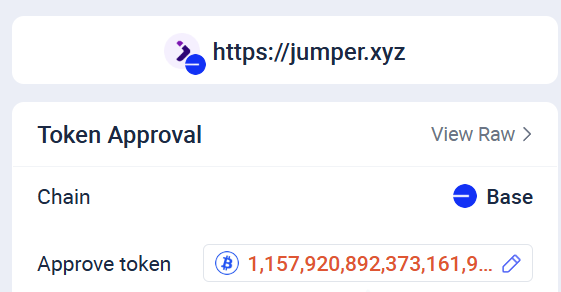
My advice is to never approve an infinite spending amount, and use "Approve token” to edit the token amount and set it only to how much you need to spend now.
The idea behind this is to protect yourself against potential future exploits.
Because if you give an infinite token approval to a dApp that gets exploited one month later, then its hacker may be able to steal the tokens you approved spending.
If you want to revoke your past token approvals, I suggest using revoke.cash.
3. Store your recovery phrase in multiple different locations
Especially if you hold a significant amount of your net worth in crypto, it’s important to eliminate all single points of failure.
My advice is to store your recovery phrase in at least two separate safe locations. (offline, definitely not on your PC)
So if something happens with the first backup, you’ll still have access to your funds.
Additionally, if you’re concerned someone may find your recovery phrase, you could encrypt it or write the words in a custom order that only you know.
But there are pros and cons to this. If you add too much complexity to this process, there’s a risk that you will forget how to get access to your funds. This is something to consider.
One more thing you can do, if you want to go one step further, is to buy, for instance, a 6mm-thick titanium plate from Ledger or Trezor to write your recovery phrase on it.
Unlike paper, this material is waterproof, fireproof, and bulletproof, so it is much more durable.
There are a few more things I want to share.
But before that, here’s an overview of Ouinex, an everything crypto exchange:
Together with Ouinex
The first exchange with a no-CLOB execution model

Many crypto exchanges claim to have low trading costs.
The issue is that while their trading fees might be low, market makers can still use tactics like stop hunting, spoofing, or front-running to execute your orders at unfavorable prices.
Ouinex eliminates this risk through its novel no-CLOB execution model, making trading fairer and more transparent.
On top of that, it has recently launched its Season 1 points program.
Here are a few things you should know about Ouinex:
On Ouinex, you can trade a wide range of asset classes, including crypto, stocks, indices, commodities, and forex.
The project has raised $9 million in funding from retail and professional traders.
The exchange offers advanced trading features such as slippage control, trading alerts, complex order types, and in-app market news.
Ouinex generated $122M in trading volume during the first week of Season 1, with traders earning approximately 1 point for every $22 traded.
That means its points are still easy to earn.
On top of the points program, Ouinex has also launched Trading Arena.
Up to $1 million in rewards will be distributed to traders across multiple trading competitions, which is a substantial prize pool given Ouinex’s current trading volume.
By trading on Ouinex, you can farm two types of rewards at once: airdrop points and stablecoin prizes.
4. Be extremely careful with what you install on your device
I know this sounds obvious, but many people still install untrusted apps or cracked games on the same device they use to do crypto transactions.
If this is you, I suggest either getting a separate laptop/PC for crypto if you can afford that, or resetting your Windows and being very selective with what you install.
Theoretically, even if you get malware on your laptop/PC, your funds stored on a hardware wallet are still safe.
However, hackers are extremely ingenious.
They could, for instance, trick you into signing a malicious transaction once they get access to your PC, and manage to steal your funds in the end.
This is why it’s important to keep your laptop/PC safe.
5. Use a multisig wallet for your long-term holdings
Lastly, if you want something even more secure than a recovery phrase and a passphrase, the most secure option is probably to create a multisig with Safe.
(for storing assets on EVM chains)
That said, I would say that a multisig is only for highly advanced users or for those keeping a very large amount of funds on-chain.
The way I’d recommend setting it up is the following:
Buy a Ledger and a Trezor wallet from their official websites
Generate separate recovery phrases with each and store them safely
Go to app.safe.global, connect your wallets, and create a multisig Safe account with a 2/2 threshold where you add your Ledger and Trezor wallet as signers
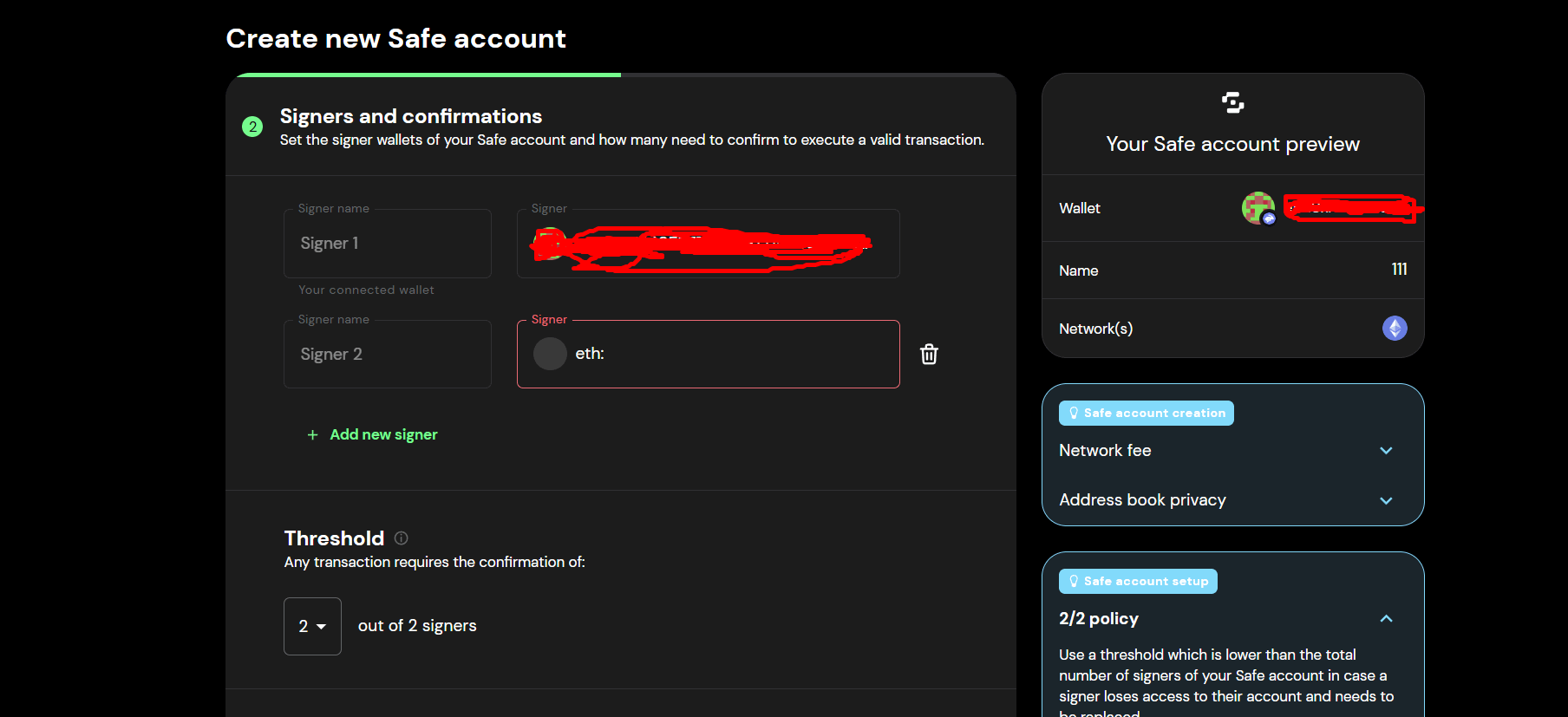
If you create a multisig and somehow your Ledger or your Trezor recovery phrase gets leaked, your funds will still be safe as long as only one of them gets leaked.
This is the security advantage of having a multisig.
However, a multisig also comes with several disadvantages:
You’ll need to securely store two recovery phrases (for Trezor and Ledger), instead of just one - if you lose one, you also lose access to your funds
Every time you need to send a transaction, you will need to sign the transaction from both your Ledger and your Trezor
Safe is the most popular multisig solution for EVM Chains, and while it is considered safe, using it introduces some extra smart contract risk
So if you ask me, while multisigs may be the safest option overall, for most people a hardware wallet with a passphrase is the best choice in terms of security and convenience in my opinion.
But I wanted to also talk about multisigs to show what the pros and cons are.
This has been a long issue, but I genuinely hope you found it helpful.
I can only imagine how hard it must feel to lose everything due to a hack.
So please take crypto security seriously to prevent this from happening to you.
Chart of the week
Monad TVL is up 96.4% in the past 30 days

Crypto meme of the week😂

The latest developments in DeFi
Uniswap launched Earn - a new lending product powered by Morpho
Solana announced a network upgrade that will make it 2x faster
Pump Fun is expected to integrate Hyperliquid perps via builder codes soon
DeFi Saver released Token Saver - a tool that checks the smart wallets linked to your account to find unclaimed airdrops or leftover token balances, and helps you claim them
Extended launched 100+ RWA markets powered by an RFQ mechanism
Sui Co-founder left Sui to join Anthropic
Kamino released Kamino Institutional Yield - a product that brings institutional credit markets on-chain
Term Labs launched Term V2 - a fixed-rate lending product with an orderbook model
Ethereum devs proposed significantly reducing ETH staking rewards
Hyperliquid enabled the permissionless creation of HIP-4 markets on testnet
BitGo is migrating WBTC from LayerZero to Chainlink’s CCIP cross-chain solution
Western Union launched a stablecoin card on Solana
Ondo airdropped $100 to Hyperliquid’s HIP-3 traders who also have an Ondo Perps account
Circle scheduled the launch of its L1 blockchain called Arc for Sept. 16
That’s all for this week!
Until next time,
The DeFi Investor
Want to sponsor this newsletter?
Please send me a DM on Twitter (X). I have a sponsorship deck that I can send you.